
Your Browsing History


George E.
Joined on 06/01/06
0
0
Retired former sysadmin and computer hardware tech, gamer, dabbler in things musical and graphical.


product reviews
- 15
Massive card, but bad placement of the power tap
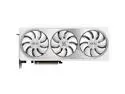
GIGABYTE AERO GeForce RTX 4070 Ti 12GB GDDR6X PCI Express 4.0 x16 ATX Graphics Card GV-N407TAERO OCV2-12GD
Pros: Very aesthetic design, lots of cooling. Seems very solid and (hopefully) with a proper bracket to support the card's weight, it won't have any issues with cracks in the PCB from sheer mass. A metal bracket kit is included, along with hardware to mount it.
Cons: Power tap uses an adapter cable (16pin 4070TI to two PCIe) to connect to power, and combination of where the power connection is located (opposite side from the PCIe expansion connector) and the pigtail itself means you'll have a big ugly black cable staring at you from the other side of your glass.
Overall Review: Definitely recommended, especially if you use it for content creation (it's an awesome gaming card, but paired with the Z790 Aero G motherboard it really shines with video editing.) I would advise any buyers of this card to also get an "L-Adapter" 16pin 4070 adapter cable, that will route your power connection cables down rather than straight at your side panel, for a cleaner install. Or, spring for a riser bracket and orient the card facing up so as to show off the lovely fans.
8/29/2023See more detail
Matched pairs work great together... when they work.
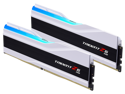
G.SKILL Trident Z5 RGB Series 32GB (2 x 16GB) 288-Pin PC RAM DDR5 6400 (PC5 51200) Desktop Memory Model F5-6400J3239G16GX2-TZ5RW
Pros: Fast memory is fast. A good matched set will run in XMP mode with no issues.
Cons: Sometimes a bad stick (or two) will get past QA. I got two of them in the same pack, they threw bit errors consistently from the same address ranges, test after test. Why is computer rebooting at random? Why are apps crashing with no warning? Bad Memory.
Overall Review: With ANY memory purchase, you should use a utility like MemTest86 to check it out before you finalize the build. Test in pairs, or singly, and test a suspect pair in the other two motherboard slots - it could be the board and not the RAM. Even the best companies let a bad product off the production floor on occasion. Since these are sold in matched pairs, as long as they check out as OK in MemTest86, they'll likely work together really well even when driven to XMP specs. Also... don't throw away the packaging. If you do get a bad stick, or pair, you want to be able to return them for exchange. OOOPS.
9/10/2023See more detail
Fast and efficient NVMe module, heatsink redundant and ... not easily discarded
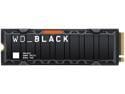
WD_BLACK 2TB SN850X NVMe Internal Gaming SSD Solid State Drive with Heatsink - Works with Playstation 5, Gen4 PCIe, M.2 2280, Up to 7,300 MB/s - WDS200T2XHE
Pros: Drive is very fast and handles raw video files from my cameras without flinching. Windows install went so fast I didn't have time to brew coffee, much less drink it.
Cons: The "with heatsink" version has a permanently affixed heatsink case (it's glued on!) that is too thick to fit under motherboard heat exchanger shrouds.
Overall Review: So, here's the thing. Most high end motherboards these days come with all manner of heat shields, shrouds, exchangers, and the like, both to protect M.2 form factor SSD's and to hide them away and pretty up the build. There's also third parties selling waterblocks for M.2 drives, if you REALLY want to cool them down. Which means, if you get this drive with the heatsink attached, you are not only sacrificing the look of your build to have a big black heatshield front and center, you're throwing away money for a 'feature' that is actually a handicap. The heatsink itself is glued to the drive, as well as clamped into a metal bracket. You don't want to spend your build time struggling to divorce drive from heatsink (and likely void the warranty in the process.) Now, I can chalk this up to Being Uninformed at time of purchase, but other buyers don't have to be. Get the version WITHOUT the heatsink. It's twenty dollars less, and it will FIT under those lovely heat exchanger shrouds your motherboard came with. The drive itself performs amazingly well, so the expense of the BLACK variants of Western Digitals NVMe M.2 5.0 SSD drives are well worth the money.
8/30/2023See more detail
We heard you like white cables so we made sure there were white cables in your white cables.
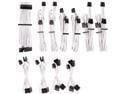
Corsair CP-8920224 Premium Individually Sleeved PSU Cables Pro Kit Type 4 Gen 4 - White
Pros: An essential kit for anyone putting a Corsair Type 4 power supply into a white case build. Just about every cable you'd need is included (multiple SATA, MOLEX, and PCI-E along with CPU and motherboard cables.) SATA and MOLEX cables each have three taps inline, for connecting up drives or other devices that need power. Motherboard, CPU, and PCI-E cables have small organizers at the business end, to keep them from looking twisted or tangled in your build. Every cable is wrapped in braided paracord. Not every bundle, every CABLE. Cables are long enough to be routed behind the motherboard backplane for nearly any case on the market.
Cons: There is no 4-pin CPU power cable for boards with 8+4 CPU power sockets. Since this is usually only needed with overclocked builds that may pull more power, it's a minor niggle. This kit does not have a 16-pin connector cable for 4070 GFX cards, so you'll need to hunt down a Y-pigtail to connect 2 8-pin PCIe cables to your 4070TI card (one probably comes with the card, but... mind the fitment, those connector pins are small and don't seat well.)
Overall Review: One thing that always detracts from a build are stock power cables, even ones from a high-end vendor. With modular power supplies, though, you're not limited to what comes with the PSU itself - you can get cabling kits in whatever color you like that will work both with the PSU's modular connectors (these are Corsair Type 4) and the components in your build. With a few minor exceptions, this kit will provide power to just about everything in your high-end gaming PC, and look good in the process. The cables themselves are long (good for creative cable management) and individually protected with braided paracord, and the bigger bundles include combs to keep them organized and looking pretty. Now if we could just get sleeve kits for those wires provided with the case...
8/30/2023See more detail
Efficient and Smart Looking AIO for white case builds

CORSAIR H150i RGB ELITE Liquid CPU Cooler - White - 16 Dynamic RGB LEDs - AF120 ELITE PWM Fans - Intel LGA 1851/1700/1200/2066 & AMD AM5/AM4 Sockets Compatible
Pros: Fans can be mounted however needed on the radiator for airflow and for cable management (inlet for front mount rads, exhaust for top-mount rads, remember 'cage side is breeze side'). Included pump brackets work with practically any board/CPU combo in use today. Logo plate is magnetic, so can be rotated to work with any orientation No mess of cables to work out aRGB signal, it's all controlled by the pump's USB data connection. Default aRGB scheme isn't "rainbow puke" like many other RGB-illuminated devices.
Cons: It's a white kit, but the cable to connect the AIO to the mobo and to power is black (the radiator fans have white cables, but they're the most easily hidden)? Hose lengths from pump to radiator limit placement choices somewhat Pre-spread thermo paste gets EVERYWHERE if allowed to touch anything
Overall Review: This is a very nice looking AIO for builds using white cases - nearly everything is white, including the pump-to-rad hoses and the fan shrouds. It's identical to the black H150I kit in all other respects. iCue works flawlessly to set everything up, and then gets out of the way when you want to use something else to sync up all of your aRGB stuff (keyboards, mice, et cetera). The USB-C portion of the cable harness and the fan header, USB header, and SATA power connectors are, unfortunately, black, and these elements you cannot hide easily. The pre-applied thermal paste makes a mess if you don't handle the pump carefully, so if you're doing a mockup leave the plastic protector on until you're ready for assembly. I ended up wiping it off completely with facial tissues and a lens cleaning wipe, and then applying my own paste when I needed it. I know this is an industry thing now, but it's not that expensive to include a small tube of paste and leaving the pump transfer plate pristine.
8/30/2023See more detail
Nice content creator board
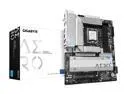
GIGABYTE Z790 AERO G LGA 1700 Intel Z790 ATX Motherboard with DDR5, 5* 5.0 M.2, PCIe 5.0, USB 3.2 Gen2X2 Type-C, WiFi 6E, Intel 2.5GbE LAN
Pros: Very clean layout Lots of storage options (5 NVMe slots, plus four onboard SATA connectors on the side of the board) Included WiFi antenna with two coax barrel connectors in the I/O panel Heat shrouds everywhere! Lots of fan headers for those who need a lot of fans and don't want to use a fan splitter/controller. Included noise sensor
Cons: No onboard power switch Does not come with a pinout diagram and the "quick install" guide (hidden behind a QR code in a booklet) doesn't go into details.
Overall Review: This is a very clean board, very hefty too. Heatsinks EVERYWHERE. Also hidden under the shrouds are five NVMe slots, so for content creators you can load up on storage. Just make sure to get NVMe's without heatsinks, or you'll have to get creative with the shrouds (I'm probably going to use a couple of standoffs to raise one up to clear the heatsink on my SSD). I don't build systems often, so it's been a minute since I've last wired a motherboard. As such, I depend on wiring/pinout diagrams to tell me where everything is. I'm probably going to do without a few of the 'quirks and features' of this board simply because I don't have the patience (or a jeweler's magnifying glass) to track them all down. Also... there's no onboard power button! just a reset and what looks like a mode change button for the aRGB. So forget about workbench testing unless you have a jumper with a momentary switch laying around.
8/29/2023See more detail