





Please read before purchasing
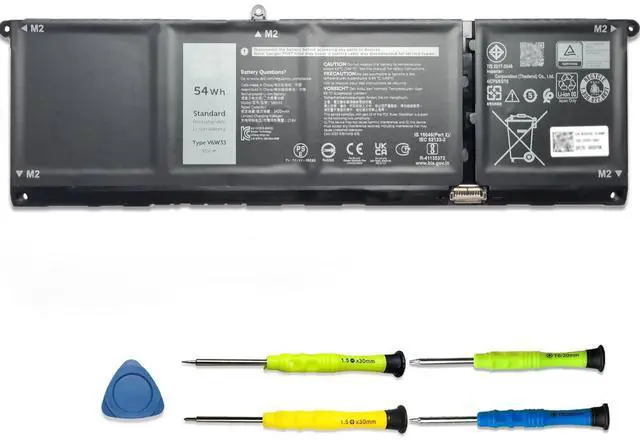
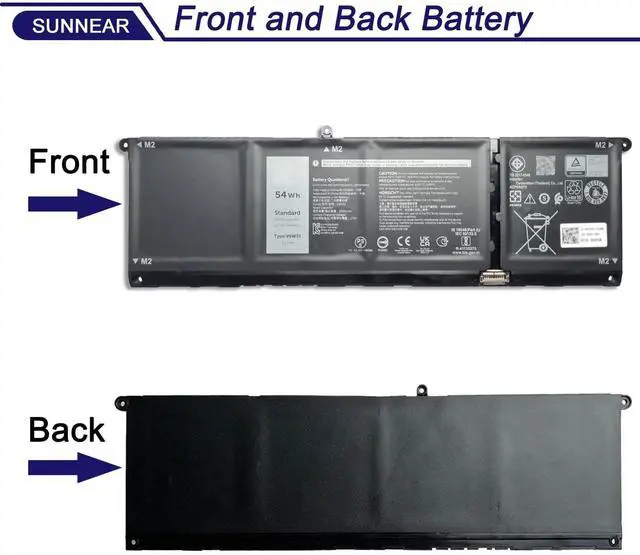
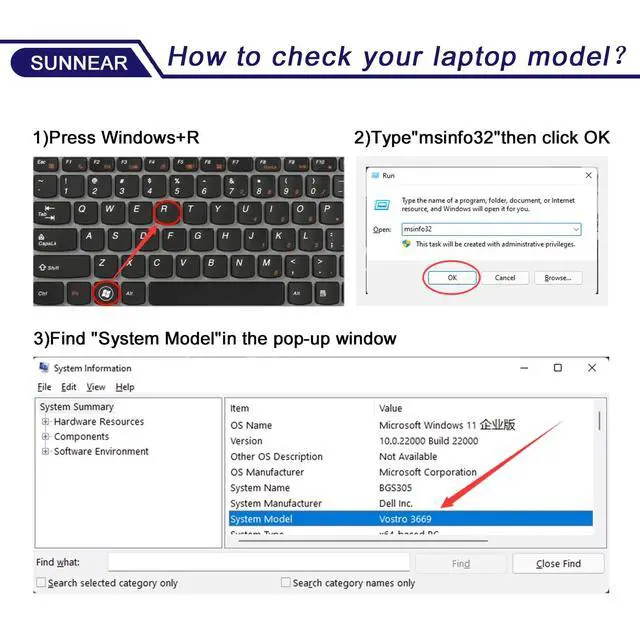
Please open your laptop case, check and confirm your original battery model and appearance, compared with our battery image, make sure that's what you need. Especially the location of the connector and the cable length (long or short).

Battery Specification:
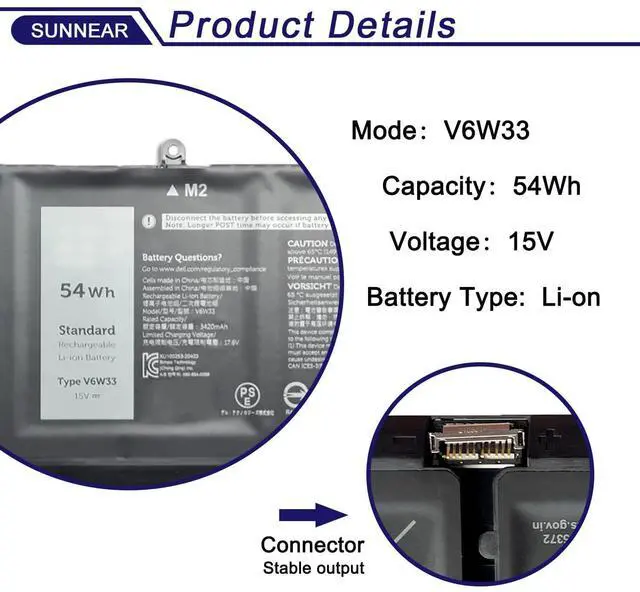
Models: V6W33
Voltage: 15V
Capacity: 54Wh/3600mAh
Battery Type: Li-ion
Battery Condition: Brand New
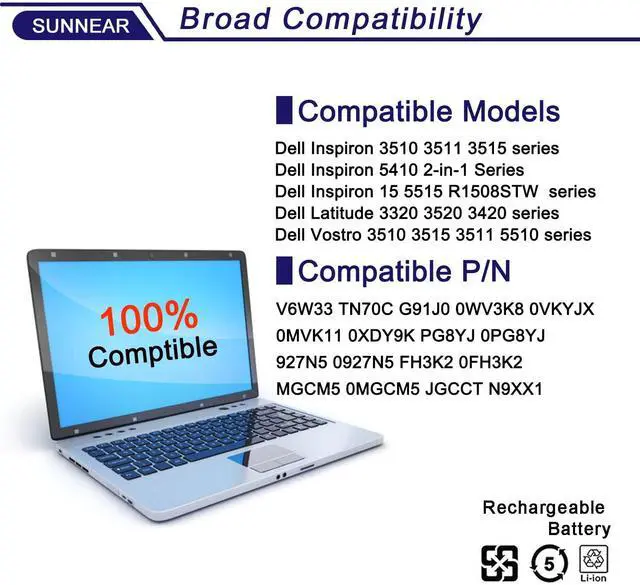
Compatible Part Number: V6W33 TN70C G91J0 0WV3K8 0VKYJX 0MVK11 0XDY9K PG8YJ 0PG8YJ 927N5 0927N5 FH3K2 0FH3K2 MGCM5 0MGCM5 JGCCT N9XX1

Replacement for
- Dell Inspiron 3510 3511 3515 5310 5410 5415 5418 5510 5515 5518 series Notebook.
- Dell Inspiron 5410 2-in-1 Series Notebook.
- Dell Inspiron 15 5515 R1508STW R1608STW R1708STW series Notebook.
- Dell Latitude 3320 3520 3420 series Notebook.
- Dell Inspiron 14 7415 2-in-1; Inspiron 14 7420 2-in-1; Inspiron 14 7425 2-in-1; Inspiron 14 7430 2-in-1; Inspiron 14 7435 2-in-1; Inspiron 14 7445 2-in-1 Series
6. Dell Vostro 15 3510 3511 3515 3520 3525 3530 3535 3562 13 5310 5320 14 3420 3425 3430 3435 5410 5415 15 5510 5515 16 5620 5625 5630 5635 5640 series Notebook.
7. Dell Inspiron 16 5625 series Notebook

Notice: V6W33 works for your computer without a hard drive, while G910 is for your computer with a hard drive. Please make sure to check this carefully—we sell the V6W33.

Battery Maintenance Methods for Optimal Use
1. When you get the new battery, run it down to 5% (not 0%), then power it up to 95%, and repeat this cycle 3-4 times to wake up the new battery.
2. The important point is to carry out a full run-down and power-up cycle every other month to extend the battery life.
3. When using the battery, do not keep it connected to the adapter for a long time, as this may damage the battery.
4. Avoid subjecting the battery to manual impact, disassembly, crushing, or puncturing. Do not dispose of the battery in fire or water.

Why should l choose SUNNEAR battery?
Brand new from manufacturer. Tested with strict quality control standards
up to 600 reusable power cycles
Grade A cells ensure High capacity and smart chip ensure low power consumption
CE / FCC / RoHS certified for safety and stability

Troubleshooting Methods
- Could be caused by battery loose. Please remove the battery and try to install more than once.
- May be due to conductive material damaged which the laptop motherboard and battery anode and cathode contact position, you can try to confirm it with your original battery.
- Check whether the battery drive is in normal condition, if not, download the corresponding driver software to update.
- Take out the battery and press the power button for about 15 seconds to consume the internal residual power (Do not connect the power cord), and then reinstall the battery. You can try several times.
 6GTPY Laptop Battery 97Wh Replacement for Dell XPS 15 9550 9560 9570 ... |  JPFMR Laptop Battery Replacement for Dell Chromebook 3100 Series Note... |  JK6Y6 Laptop Battery Replacement for Dell Latitude 3410 3510 Vostro 5... |  69KF2 Laptop Battery Replacement for Dell XPS 15 9500 P91F P91F001 Al... |  7XNTR Laptop Battery Compatible with Dell Latitude 12 7202 7212 Rugge... | |
|---|---|---|---|---|---|
| Customer Reviews | — | — | — | — | — |
| Price | — no data | — no data | — | — no data | — |
| Model | 6GTPY | JPFMR | JK6Y6 | 69KF2 | 7XNTR |
| Battery Type | Li-ion | Li-ion | Li-ion | Li-ion | Li-ion |
| Voltage | 11.4V | 11.4V | 11.4V | 11.4V | 7.4V |
| Capacity | 97Wh | 42Wh | 40Wh | 86Wh | 26Wh |
Please read before purchasing
Please open your laptop case, check and confirm your original battery model and appearance, compared with our battery image, make sure that's what you need. Especially the location of the connector and the cable length (long or short).
Battery Specification:
Models: V6W33
Voltage: 15V
Capacity: 54Wh/3600mAh
Battery Type: Li-ion
Battery Condition: Brand New
Compatible Part Number: V6W33 TN70C G91J0 0WV3K8 0VKYJX 0MVK11 0XDY9K PG8YJ 0PG8YJ 927N5 0927N5 FH3K2 0FH3K2 MGCM5 0MGCM5 JGCCT N9XX1
Replacement for
- Dell Inspiron 3510 3511 3515 5310 5410 5415 5418 5510 5515 5518 series Notebook.
- Dell Inspiron 5410 2-in-1 Series Notebook.
- Dell Inspiron 15 5515 R1508STW R1608STW R1708STW series Notebook.
- Dell Latitude 3320 3520 3420 series Notebook.
- Dell Inspiron 14 7415 2-in-1; Inspiron 14 7420 2-in-1; Inspiron 14 7425 2-in-1; Inspiron 14 7430 2-in-1; Inspiron 14 7435 2-in-1; Inspiron 14 7445 2-in-1 Series
6. Dell Vostro 15 3510 3511 3515 3520 3525 3530 3535 3562 13 5310 5320 14 3420 3425 3430 3435 5410 5415 15 5510 5515 16 5620 5625 5630 5635 5640 series Notebook.
7. Dell Inspiron 16 5625 series Notebook
Notice: V6W33 works for your computer without a hard drive, while G910 is for your computer with a hard drive. Please make sure to check this carefully—we sell the V6W33.
Battery Maintenance Methods for Optimal Use
1. When you get the new battery, run it down to 5% (not 0%), then power it up to 95%, and repeat this cycle 3-4 times to wake up the new battery.
2. The important point is to carry out a full run-down and power-up cycle every other month to extend the battery life.
3. When using the battery, do not keep it connected to the adapter for a long time, as this may damage the battery.
4. Avoid subjecting the battery to manual impact, disassembly, crushing, or puncturing. Do not dispose of the battery in fire or water.
Why should l choose SUNNEAR battery?
Brand new from manufacturer. Tested with strict quality control standards
up to 600 reusable power cycles
Grade A cells ensure High capacity and smart chip ensure low power consumption
CE / FCC / RoHS certified for safety and stability
Troubleshooting Methods
- Could be caused by battery loose. Please remove the battery and try to install more than once.
- May be due to conductive material damaged which the laptop motherboard and battery anode and cathode contact position, you can try to confirm it with your original battery.
- Check whether the battery drive is in normal condition, if not, download the corresponding driver software to update.
- Take out the battery and press the power button for about 15 seconds to consume the internal residual power (Do not connect the power cord), and then reinstall the battery. You can try several times.
6GTPY Laptop Battery 97Wh Replacement for Dell XPS 15 9550 9560 9570 ... | JPFMR Laptop Battery Replacement for Dell Chromebook 3100 Series Note... | JK6Y6 Laptop Battery Replacement for Dell Latitude 3410 3510 Vostro 5... | 69KF2 Laptop Battery Replacement for Dell XPS 15 9500 P91F P91F001 Al... | 7XNTR Laptop Battery Compatible with Dell Latitude 12 7202 7212 Rugge... | |
|---|---|---|---|---|---|
| Customer Reviews | — | — | — | — | — |
| Price | — no data | — no data | — | — no data | — |
| Model | 6GTPY | JPFMR | JK6Y6 | 69KF2 | 7XNTR |
| Battery Type | Li-ion | Li-ion | Li-ion | Li-ion | Li-ion |
| Voltage | 11.4V | 11.4V | 11.4V | 11.4V | 7.4V |
| Capacity | 97Wh | 42Wh | 40Wh | 86Wh | 26Wh |