


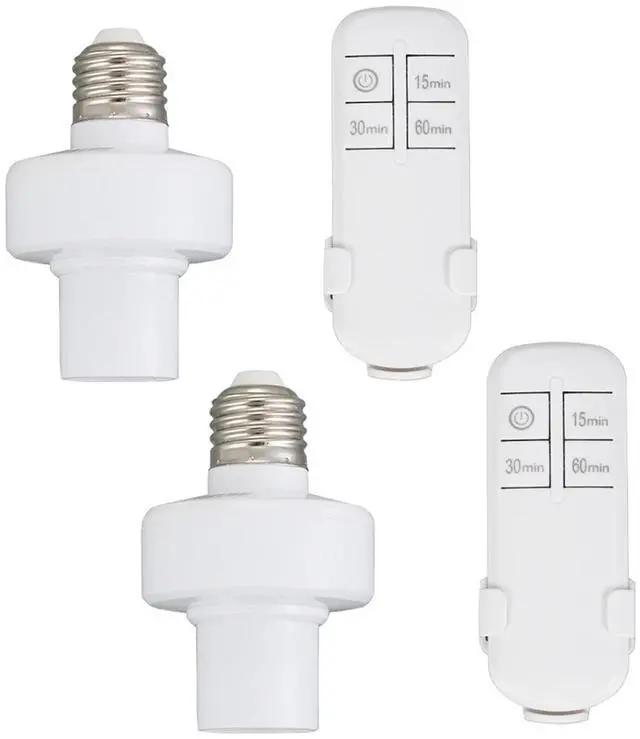


Specifications:
Color: White
Socket Type:Standard E26/E27
Volatage: AC 110-120V,50/60Hz
Remote Control Distance: 50ft (Free Area)
Transmitter Battery: 2*AAA batteries (not included)
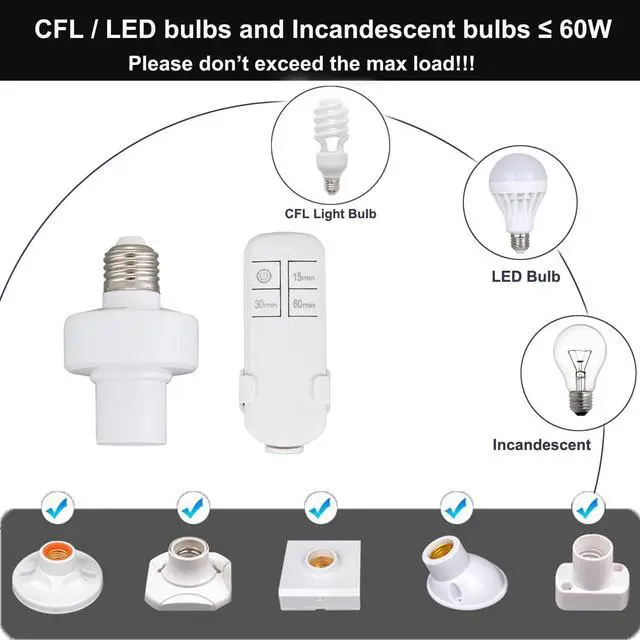
Max.load Power: LED/CFL 60W; Incandescent Bulb 60W
No drive or software needed, very simple to use.
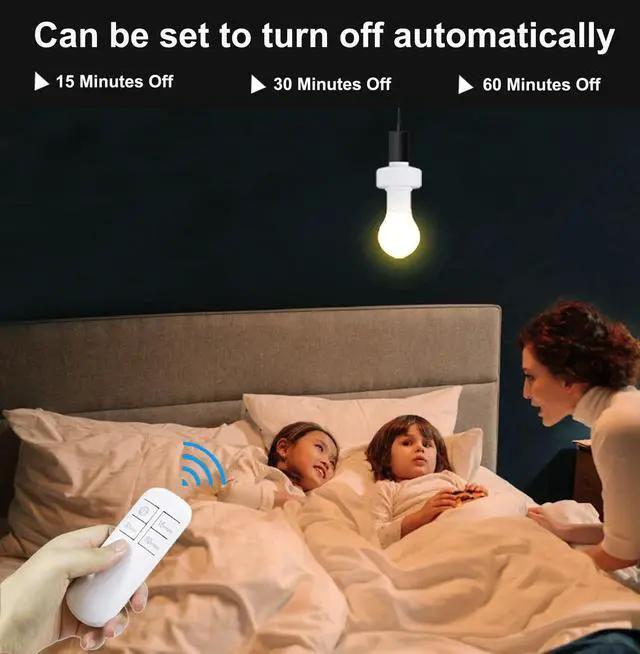
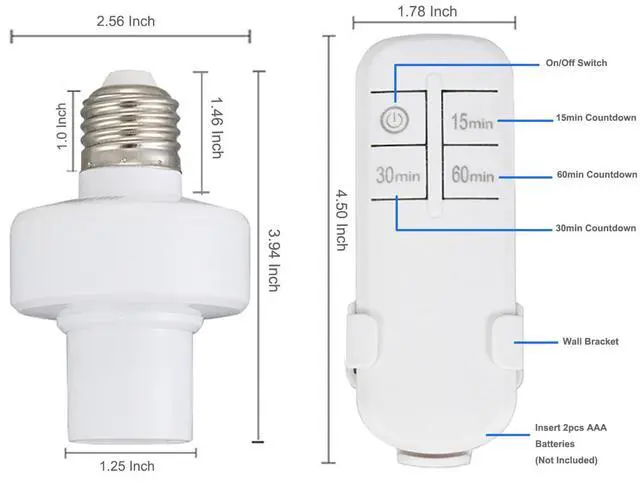
The remote controller designs with timing functions (15/30/60 minutes).
Perfect for the elderly, pregnant woman and those with limited mobility or back pain; make your life convenient, safer, and energy efficient.

15/30/60 Minutes Timer
This wireless control light socket kit has a timing function, remote control lamp socket allows you to set a 15, 30 minutes or 60 minutes timing to cut the light off. Now you don't have to worry about forgetting to turn off the lights anymore, and you can save energy and money.

No Wiring,Simple and Convenient
No wiring required, no need to install wall switches, only a remote control is needed to remotely control the light bulb to turn on and off.Perfect for the elderly, pregnant woman and those with limited mobility or back pain; make your life convenient, safer, and energy efficient.

50FT Long Remote Range
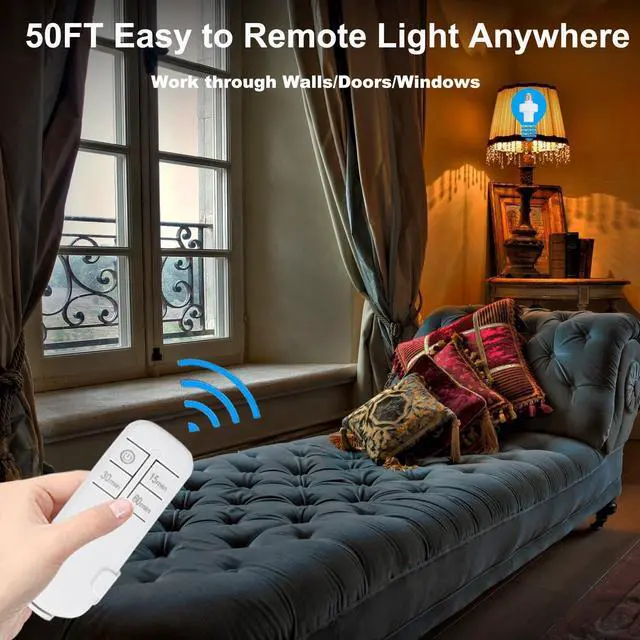
Up to 50 feet control range in open areas, lamp socket is convenient to remote control of garage, porch, stairway, basement lights from your couch or bed; the strong RF signal of adapter can pass through walls and doors without any interference.
Easy to Install

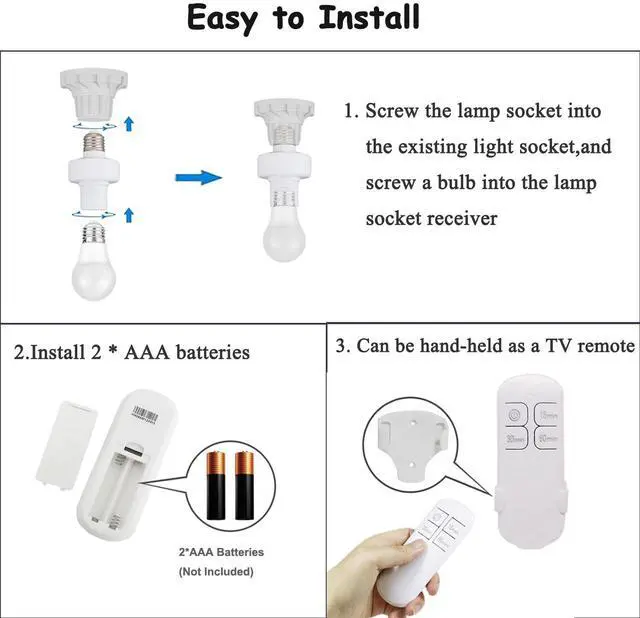
Step 1: Screw the light socket into the existing light socket, and screw a bulb into lamp socket receiver

Step 2: The remote control needs to insert 2 AAA batteries before use. Pls notice that the batteries is not included in our package.

Step 3: Can be hand-held as a TV remote
Applicable Scenarios


 Remote Control Light Socket,Wireless Light Switch Kit with Timer,E26 E27 Bulb... |  Remote Control Light Sockets,Wireless Light Switch kit with Timer,15/30/60min... |  Remote Control Light Bulb Socket,Wireless Light Socket Switch Kit,Remote Ligh... | |
|---|---|---|---|
| Customer Reviews | — | — | — |
| Price | — | — | — |
| Quantity | 2 PCS | 3 PCS | 4 PCS |
Quick Troubleshooting Guide for Remote Control Light Socket
Step 1: Check Basic Setup (Resolves 80% of issues
1. Confirm Power Supply
? Correct Operation: Ensure the wall switch is in the "ON" position and the lamp holder is receiving power.
2. Check Remote Control Batteries
? Correct Operation: Open the battery compartment, confirm the batteries are installed with correct polarity (+/-). Replace with new batteries if power is low.
Step 2: Re-pair the Remote Control (Required after initial installation or if buttons become unresponsive)
1. Turn off the wall switch and wait for 10 seconds.
2. Turn the switch back on. Within 10 seconds, press and hold the ON/OFF button on the remote until the light bulb turns on.
3. The remote control has now completed re-pairing.
Step 3: Eliminate Signal Interference
? Correct Operation:
· Point the remote directly at the bottom of the lamp holder (signal receiver area).
· Recommended operating distance is within 3-15 meters.
· Temporarily turn off nearby WiFi routers, microwaves, and wireless speakers.
· Avoid using multiple wireless devices on the same frequency band in the same room.
Step 4: Final Self-Checks
? Correct Operation:
· Try replacing the bulb with a standard one to confirm the lamp holder is powered.
· Do not connect this product to a dimmer switch or smart switch. It must be connected to a standard (non-dimming) circuit.
· Remote Self-Test: With working batteries correctly installed, press the ON/OFF button. If you see a red indicator light on the remote, it is functioning normally.
If the issue persists after all steps above, please tell us anytime. We are committed to resolving your problem.Thanks.
Specifications:
Color: White
Socket Type:Standard E26/E27
Volatage: AC 110-120V,50/60Hz
Remote Control Distance: 50ft (Free Area)
Transmitter Battery: 2*AAA batteries (not included)
Max.load Power: LED/CFL 60W; Incandescent Bulb 60W
No drive or software needed, very simple to use.
The remote controller designs with timing functions (15/30/60 minutes).
Perfect for the elderly, pregnant woman and those with limited mobility or back pain; make your life convenient, safer, and energy efficient.
15/30/60 Minutes Timer
This wireless control light socket kit has a timing function, remote control lamp socket allows you to set a 15, 30 minutes or 60 minutes timing to cut the light off. Now you don't have to worry about forgetting to turn off the lights anymore, and you can save energy and money.
No Wiring,Simple and Convenient
No wiring required, no need to install wall switches, only a remote control is needed to remotely control the light bulb to turn on and off.Perfect for the elderly, pregnant woman and those with limited mobility or back pain; make your life convenient, safer, and energy efficient.
50FT Long Remote Range
Up to 50 feet control range in open areas, lamp socket is convenient to remote control of garage, porch, stairway, basement lights from your couch or bed; the strong RF signal of adapter can pass through walls and doors without any interference.
Easy to Install
Step 1: Screw the light socket into the existing light socket, and screw a bulb into lamp socket receiver
Step 2: The remote control needs to insert 2 AAA batteries before use. Pls notice that the batteries is not included in our package.
Step 3: Can be hand-held as a TV remote
Applicable Scenarios
Remote Control Light Socket,Wireless Light Switch Kit with Timer,E26 E27 Bulb... | Remote Control Light Sockets,Wireless Light Switch kit with Timer,15/30/60min... | Remote Control Light Bulb Socket,Wireless Light Socket Switch Kit,Remote Ligh... | |
|---|---|---|---|
| Customer Reviews | — | — | — |
| Price | — | — | — |
| Quantity | 2 PCS | 3 PCS | 4 PCS |
Quick Troubleshooting Guide for Remote Control Light Socket
Step 1: Check Basic Setup (Resolves 80% of issues
1. Confirm Power Supply
? Correct Operation: Ensure the wall switch is in the "ON" position and the lamp holder is receiving power.
2. Check Remote Control Batteries
? Correct Operation: Open the battery compartment, confirm the batteries are installed with correct polarity (+/-). Replace with new batteries if power is low.
Step 2: Re-pair the Remote Control (Required after initial installation or if buttons become unresponsive)
1. Turn off the wall switch and wait for 10 seconds.
2. Turn the switch back on. Within 10 seconds, press and hold the ON/OFF button on the remote until the light bulb turns on.
3. The remote control has now completed re-pairing.
Step 3: Eliminate Signal Interference
? Correct Operation:
· Point the remote directly at the bottom of the lamp holder (signal receiver area).
· Recommended operating distance is within 3-15 meters.
· Temporarily turn off nearby WiFi routers, microwaves, and wireless speakers.
· Avoid using multiple wireless devices on the same frequency band in the same room.
Step 4: Final Self-Checks
? Correct Operation:
· Try replacing the bulb with a standard one to confirm the lamp holder is powered.
· Do not connect this product to a dimmer switch or smart switch. It must be connected to a standard (non-dimming) circuit.
· Remote Self-Test: With working batteries correctly installed, press the ON/OFF button. If you see a red indicator light on the remote, it is functioning normally.
If the issue persists after all steps above, please tell us anytime. We are committed to resolving your problem.Thanks.