Out of stock
This item is currently out of stock and it may or may not be restocked.
Sold by Newegg

Shipped by Newegg

Shop it at NeweggBusiness.

4 in 1 Out KVM HDMI Switch, 4K Quad Multi Viewer 4x1 Seamless Switcher with Keyboard Hotkey, 4 Port HDMI KVM Quad Multi-Viewer 4 Computers share 1 Monitor Keyboard Mouse with IR Remote Control

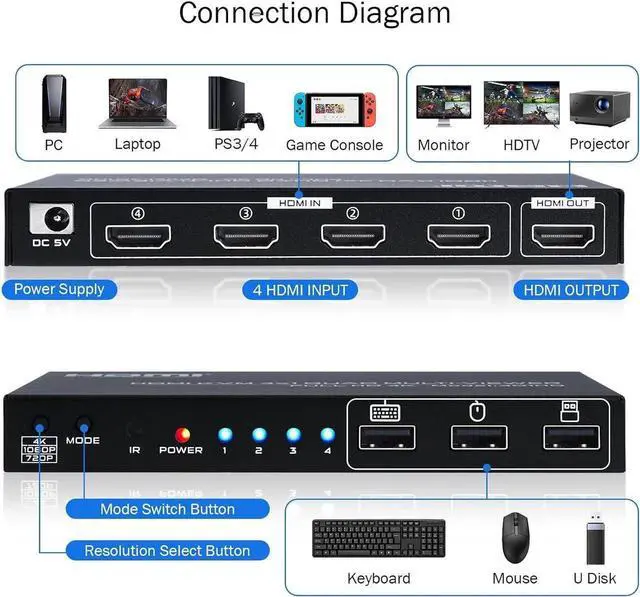
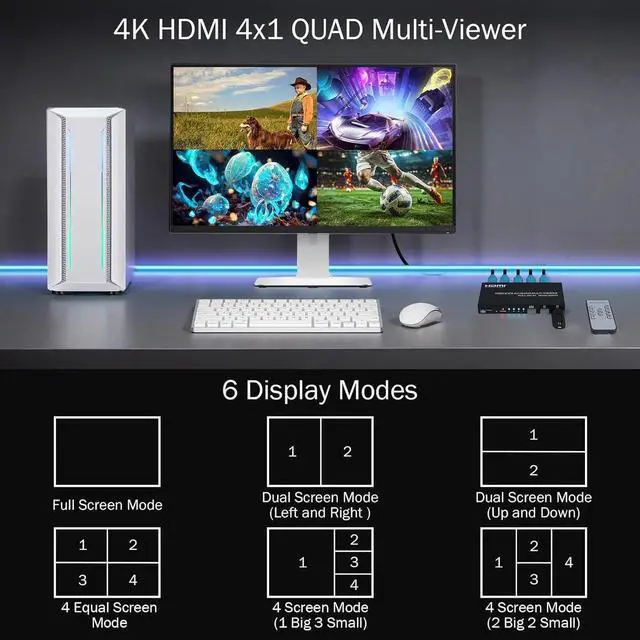
  • 4x1 Quad Multiviewer KVM Switch: This 4 in 1 out HDMI KVM Switch allows you to control 4 computers/ PC with 1 set of monitor, mouse and keyboard. Seamless switching between 4 HDMI sources without frequently changing devices.
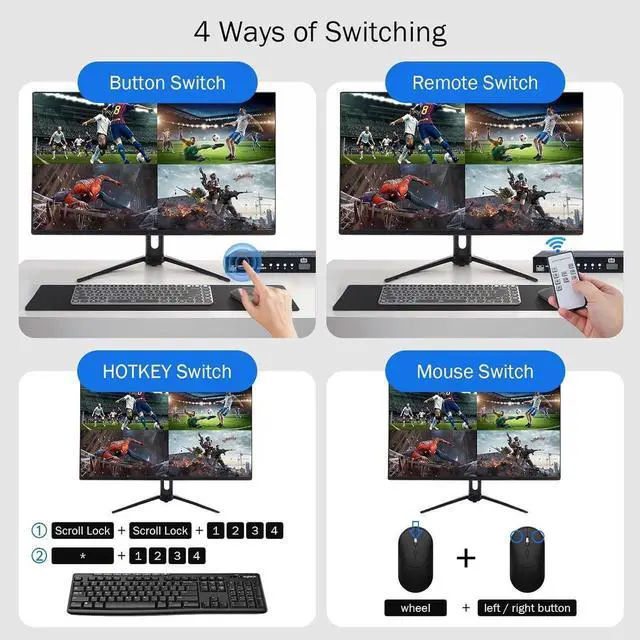
  • Hotkey Switching for USB Devices: (1)scroll lock + scroll lock + 1/2/3/4; (2)numeric keypad * + 1/2/3/4 (Simultaneously press); (3)mouse wheel + left / right mouse button (Simultaneously press).
  • On/Off multi-screen crossing mode: scroll lock + scroll lock + F12. Crossing mode allows keyboard and mouse cross between HDMI sources, which means you can control max 4 computer at the same time.
  • Multi screen synchronous control mode: numeric keypad * + 0 (Simultaneously press). Synchronous control mode means the USB devices will operate multi HDMI sources with the same way at the same time.
  • Keyboard shortcut replacement: The above shortcut key [Scroll lock] can be replaced with Ctrl or CapsLock or NumLock according to personal habits.
Overview
Specs
Reviews
avatar

Any questions? Our AI beta will help you find out quickly.

4K HDMI KVM Switch 4 in 1 out Quad Multiviewer supports 4 Computers share 1 Monitor, Keyboard, Mouse or other USB devices at the same time
Hotkey Notes:


1.
Keyboard shortcut replacement: (The following shortcut key "Scroll lock" can be replaced with Ctrl / CapsLock / NumLock according to personal habits)

scroll lock + scroll lock + "Ctrl / CapsLock / NumLock " + Enter


2. Single screen control switching for
USB devices:

1) scroll lock + scroll lock + 1/2/3/4

2) numeric keypad * + 1/2/3/4 (Simultaneously press)

3) Switch to the front / back screen of the current control screen: Press the mouse wheel + left / right mouse button (Simultaneously press)

Follow the above hotkey to choose which computer that the USB devices is controlling when multi HDMI sources showing on 1 monitor.


3.
On/Off multi-screen keyboard-and-mouse crossing mode:

scroll lock + scroll lock + F12

Crossing mode allows keyboard and mouse cross between HDMI sources, which means you can control max 4 computer at the same time.


4.
Multi screen synchronous control mode:

numeric keypad * + 0 (Simultaneously press)

Synchronous control mode means the USB devices will operate multi HDMI sources with the same way at the same time.


5.
Restore factory settings:

scroll lock + scroll lock + ESC / R

Warranty & Returns

Warranty, Returns, And Additional Information

Return Policies

LOADING...