



ELECABLE USB-A to VGA Adapter – Driver-Based Display Extension for Windows
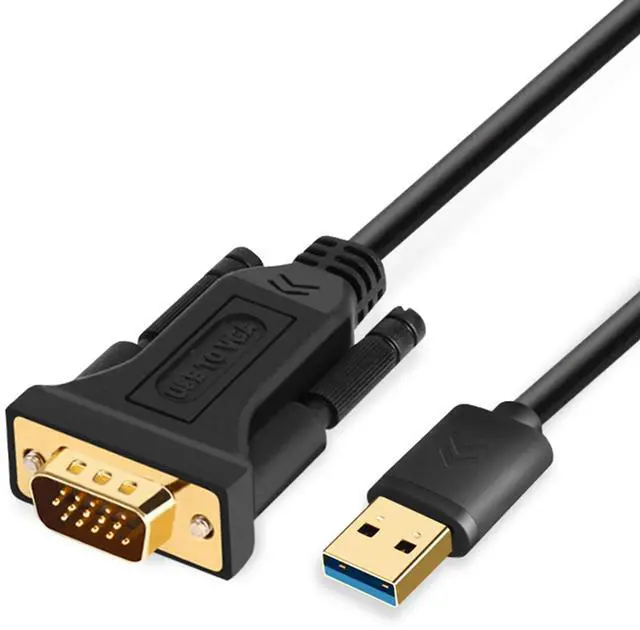
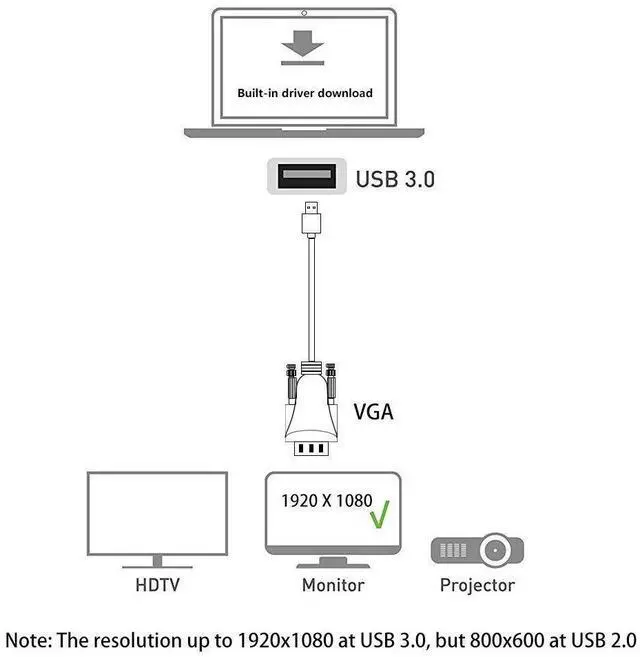
This is a USB-A to VGA Male-to-Male Adapter designed to connect your laptop or desktop to an external VGA display, such as a monitor or projector.
Important Setup Instructions:
Driver installation is mandatory. Download the driver using the included link, install it, and then restart your computer.
Make sure your monitor is set to 1080P or lower resolution before connecting the VGA end.
Not compatible with ChromeOS, Linux, or devices without driver installation capability.
Need Help? We're here for you with technical support and installation assistance.

Effortlessly connect your USB-enabled device to a VGA-enabled monitor, projector or TV with our ELECABLE USB to VGA Adapter - perfect for business presentations and conferences!
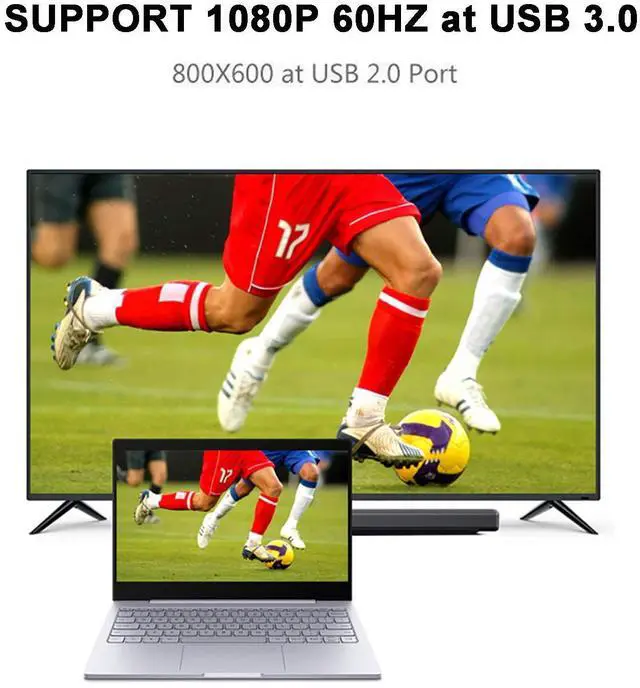
Enjoy crystal clear, high-definition video with our adapter's support for 1080p resolution.

Compatible with:
Windows 11/10/8.1/8/7.
Not supported:
macOS(12) Monterey or later /Chromebook/Linux/Android

Supports multiple expansion modes:
Includes mirror and extend mode, the same screen mapping and split screen display tow modes, more convenient and efficient.
-For first time to use, you need to install the driver. The driver is built-in. There is a flash in the adapter with driver, follow the steps to install the driver. You can also to download the latest driver from the link we provide.
Setup the Adapter
1. Download the driver from the link we provided select the correct driver for your operating system.
2. Double click on the driver file to start the installation process.
3. Follow the steps to complete the installation.
4. Once the installation is complete, please reboot your computer.
NOTE:
1. If you are working on a company computer, contact your IT specialist to log in as an Administrator having the rights to install the driver.
2. If the driver was not successfully installed, please temporarily turn off real-time antivirus protection, then reinstall it.
3. Uninstall other USB graphics drivers (such as SMSC, DisplayLink), they cannot be used on your PC simultaneously.
4. Some laptops don’t have enough juice to push the extra pixels of an external display, connect the power adapter to give it additional power.
Troubleshooting Guide:
1. No Display Output
- Check the USB Port: Ensure the cable is connected to a USB 3.0 port (blue inside). Using USB 2.0 may cause signal issues.
- Driver Installation: Download and install the latest driver from our website. Restart your computer after installation.
- Select Correct Input: Make sure your monitor or projector is set to VGA input mode.
- Test Another Device: Connect the adapter to another computer to confirm if the issue is system-specific.
2. Display Flickering or Going On/Off
- Secure Connection: Ensure both USB and VGA ends are firmly connected.
- Replace VGA Cable: If using an additional VGA cable, try another cable to rule out cable defects.
- Power Settings: Disable USB selective suspend in your computer’s Power Options.
- Update Graphics Drivers: Ensure your primary graphics drivers are up to date from your PC manufacturer’s website.
3. Driver Installation Fails
- Run as Administrator: Right-click the driver installer and select Run as Administrator.
- Disable Antivirus Temporarily: Some antivirus software may block driver installation.
- Use Latest Driver: Download the newest version from our official site.
- Windows Update: Ensure your Windows OS is updated to the latest version.
4. Monitor Not Detected
- Display Settings: Go to Display Settings ? Multiple Displays ? Detect.
- Restart Both Devices: Power cycle the computer and monitor.
- Try Different Monitor: Rule out compatibility issues with a different VGA display.
5. Compatibility Notes
- Supported OS: Windows 7 / 8 / 8.1 / 10 / 11 (Driver required).
- Not compatible withmacOS(12) Monterey or later, ChromeOS, or Linux.
- Does not support gaming or HDCP-protected content (e.g., Netflix, Hulu).
If you have other problems. You can visit our website. Most questions and concerns can be answered through our FAQ.
 USB to HDMI Cable |  Type c to VGA Cable |  USB A+C HDMI Cable |  USB to Dual HDMI |  USB to Dual DP |  Type c to HDMI with Charging Port | |
|---|---|---|---|---|---|---|
| Customer Reviews | — | — | — | — | — | — |
| Price | — | — no data | — no data | — | — | — |
| Connector | USB/HDMI | USB C/VGA | USB A+C/HDMI | USB/HDMI | USB/DisplayPort | USB C/HDMI |
| Resolution | 1080P (1920*1080 @60Hz) | 1080P (1920*1080 @60Hz) | 1080P (1920*1080 @60Hz) | 4K(4096*2160@60Hz) | 5K(5120x1440@60Hz) | 1080P (1920*1080 @60Hz) |
| Compatible OS | Windows, macOS | Windows, macOS, Android, Chrome OS | Windows10/11 | Windows, macOS, Android, Chrome OS, and Ubuntu. | Windows, macOS, Android, Chrome OS, and Ubuntu. | Windows, macOS, Android, Chrome OS |
ELECABLE USB-A to VGA Adapter – Driver-Based Display Extension for Windows
This is a USB-A to VGA Male-to-Male Adapter designed to connect your laptop or desktop to an external VGA display, such as a monitor or projector.
Important Setup Instructions:
Driver installation is mandatory. Download the driver using the included link, install it, and then restart your computer.
Make sure your monitor is set to 1080P or lower resolution before connecting the VGA end.
Not compatible with ChromeOS, Linux, or devices without driver installation capability.
Need Help? We're here for you with technical support and installation assistance.
Effortlessly connect your USB-enabled device to a VGA-enabled monitor, projector or TV with our ELECABLE USB to VGA Adapter - perfect for business presentations and conferences!
Enjoy crystal clear, high-definition video with our adapter's support for 1080p resolution.
Compatible with:
Windows 11/10/8.1/8/7.
Not supported:
macOS(12) Monterey or later /Chromebook/Linux/Android
Supports multiple expansion modes:
Includes mirror and extend mode, the same screen mapping and split screen display tow modes, more convenient and efficient.
-For first time to use, you need to install the driver. The driver is built-in. There is a flash in the adapter with driver, follow the steps to install the driver. You can also to download the latest driver from the link we provide.
Setup the Adapter
1. Download the driver from the link we provided select the correct driver for your operating system.
2. Double click on the driver file to start the installation process.
3. Follow the steps to complete the installation.
4. Once the installation is complete, please reboot your computer.
NOTE:
1. If you are working on a company computer, contact your IT specialist to log in as an Administrator having the rights to install the driver.
2. If the driver was not successfully installed, please temporarily turn off real-time antivirus protection, then reinstall it.
3. Uninstall other USB graphics drivers (such as SMSC, DisplayLink), they cannot be used on your PC simultaneously.
4. Some laptops don’t have enough juice to push the extra pixels of an external display, connect the power adapter to give it additional power.
| Length: | 5FT, 6.5FT, 10FT, 16FT |
| Input Interface: | USB 3.0 |
| Output Interface: | VGA |
| Resolution: | 1080p/1080i (1920x1080), 1600x1200, 1280x1024, 720p/720i (1280x720), 800x600, 576p/576i (768x576), 480p/480i (640x480) |
Troubleshooting Guide:
1. No Display Output
- Check the USB Port: Ensure the cable is connected to a USB 3.0 port (blue inside). Using USB 2.0 may cause signal issues.
- Driver Installation: Download and install the latest driver from our website. Restart your computer after installation.
- Select Correct Input: Make sure your monitor or projector is set to VGA input mode.
- Test Another Device: Connect the adapter to another computer to confirm if the issue is system-specific.
2. Display Flickering or Going On/Off
- Secure Connection: Ensure both USB and VGA ends are firmly connected.
- Replace VGA Cable: If using an additional VGA cable, try another cable to rule out cable defects.
- Power Settings: Disable USB selective suspend in your computer’s Power Options.
- Update Graphics Drivers: Ensure your primary graphics drivers are up to date from your PC manufacturer’s website.
3. Driver Installation Fails
- Run as Administrator: Right-click the driver installer and select Run as Administrator.
- Disable Antivirus Temporarily: Some antivirus software may block driver installation.
- Use Latest Driver: Download the newest version from our official site.
- Windows Update: Ensure your Windows OS is updated to the latest version.
4. Monitor Not Detected
- Display Settings: Go to Display Settings ? Multiple Displays ? Detect.
- Restart Both Devices: Power cycle the computer and monitor.
- Try Different Monitor: Rule out compatibility issues with a different VGA display.
5. Compatibility Notes
- Supported OS: Windows 7 / 8 / 8.1 / 10 / 11 (Driver required).
- Not compatible withmacOS(12) Monterey or later, ChromeOS, or Linux.
- Does not support gaming or HDCP-protected content (e.g., Netflix, Hulu).
If you have other problems. You can visit our website. Most questions and concerns can be answered through our FAQ.
USB to HDMI Cable | Type c to VGA Cable | USB A+C HDMI Cable | USB to Dual HDMI | USB to Dual DP | Type c to HDMI with Charging Port | |
|---|---|---|---|---|---|---|
| Customer Reviews | — | — | — | — | — | — |
| Price | — | — no data | — no data | — | — | — |
| Connector | USB/HDMI | USB C/VGA | USB A+C/HDMI | USB/HDMI | USB/DisplayPort | USB C/HDMI |
| Resolution | 1080P (1920*1080 @60Hz) | 1080P (1920*1080 @60Hz) | 1080P (1920*1080 @60Hz) | 4K(4096*2160@60Hz) | 5K(5120x1440@60Hz) | 1080P (1920*1080 @60Hz) |
| Compatible OS | Windows, macOS | Windows, macOS, Android, Chrome OS | Windows10/11 | Windows, macOS, Android, Chrome OS, and Ubuntu. | Windows, macOS, Android, Chrome OS, and Ubuntu. | Windows, macOS, Android, Chrome OS |