• $299.99
  • Free 30-day Returns
  • Price alert
    Shop it at NeweggBusiness.

    Meet Your Seller

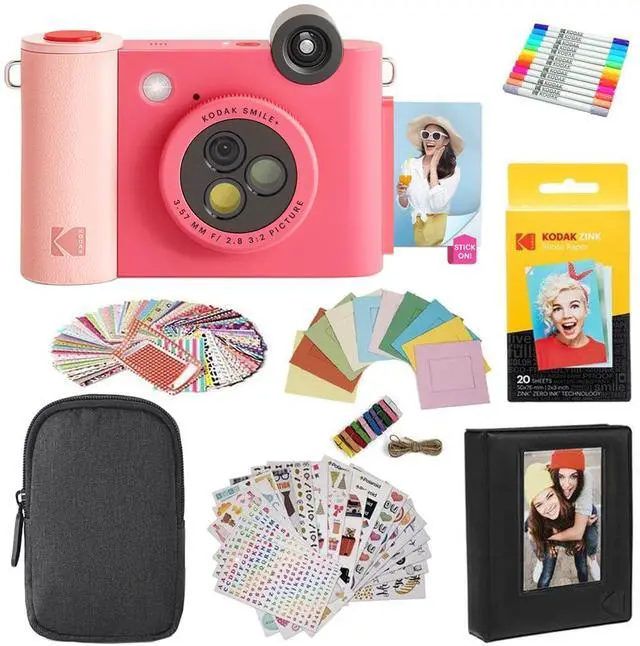
    Smile+ 2-in-1 Digital Instant Print Camera & Printer Gift Bundle + Case + Zink 2x3 Sticky Back Photo Paper 20pk + Album + Sticker Sets + Sticker Frames + Hanging Frames + Markers - Fuchsia

    • FILTER-CHANGING MAGIC Add a fresh style to each shot by using the filter-changing lens built directly onto the camera. Hold up the camera and turn the dial to switch between the natural, magenta, or yellow filter whenever you. COLORFUL, INKLESS 2 x 3 PHOTOS Capture pictures and see as beautiful, vibrant images print out on Zink ink-free, sticky-backed paper in moments with this quality, innovative camera. PERSONALIZE WITH BLUETOOTH Link this modern camera to your smartphone via Bluetooth and edit your photos with text, colors, stickers, and more before printing. SNAP IT, SAVE IT Place a microSD card into the cameras built-in microSD card slot so you can easily save the photos that you take. EASY TO USE When you are ready to take a photo, simply raise the camera, hold it steady, and press the shutter button until a notification sound is heard
    +
    +
    Overview
    Specs
    Reviews
    avatar

    Any questions? Our AI beta will help you find out quickly.

    FILTER-CHANGING MAGIC Add a fresh style to each shot by using the filter-changing lens built directly onto the camera. Hold up the camera and turn the dial to switch between the natural, magenta, or yellow filter whenever you. COLORFUL, INKLESS 2 x 3 PHOTOS Capture pictures and see as beautiful, vibrant images print out on Zink ink-free, sticky-backed paper in moments with this quality, innovative camera. PERSONALIZE WITH BLUETOOTH Link this modern camera to your smartphone via Bluetooth and edit your photos with text, colors, stickers, and more before printing. SNAP IT, SAVE IT Place a microSD card into the cameras built-in microSD card slot so you can easily save the photos that you take. EASY TO USE When you are ready to take a photo, simply raise the camera, hold it steady, and press the shutter button until a notification sound is heard

    Warranty & Returns

    Warranty, Returns, And Additional Information

    Warranty

    • Please contact the Seller directly for warranty information. Warranty information may also be found on the Manufacturer's website.
    • CONTACT

    Return Policies

    Manufacturer Contact Info

    LOADING...