Sold by Eristy shop

Shipped by Eristy shop

Price alert
Shop it at NeweggBusiness.

Meet Your Seller

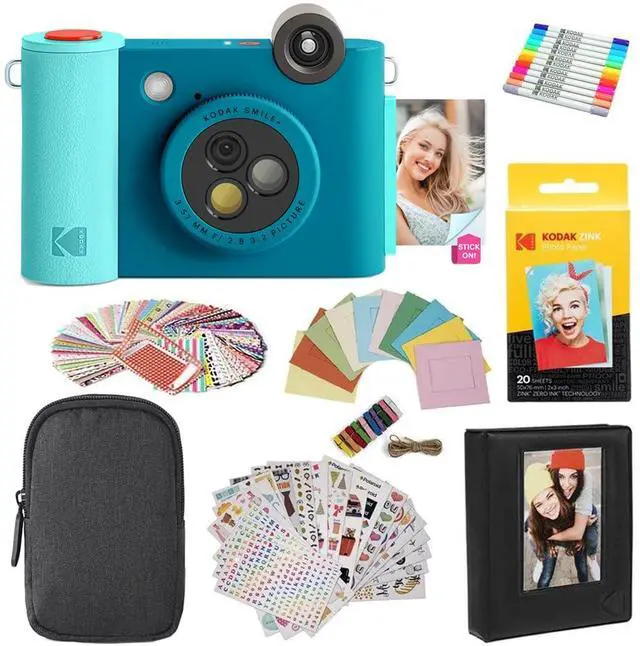
Smile+ 2-in-1 Digital Instant Print Camera & Photo Printer Gift Bundle + Case + Zink 2x3 Sticky Back Photo Paper 20pk + Album + Sticker Sets + Sticker Frames + Hanging Frames + Markers - Blue

Limited time offer, ends 07/22 By Eristy shop

  • FILTER-CHANGING MAGIC Add a new style to each shot by using the filter-changing lens built right onto the camera. Hold up the camera and turn the knob to switch between the natural, magenta, or yellow filter whenever you like. COLORFUL, INKLESS 2 x 3 PHOTOS Take pictures and watch as beautiful, vibrant images print out on Zink ink-free, sticky-backed paper in seconds with this quality, innovative camera. PERSONALIZE WITH BLUETOOTH Connect this modern-day camera to your smartphone via Bluetooth and edit your photos with text, colors, stickers, and more before you print. SNAP IT, SAVE IT Insert a microSD card into the cameras built-in microSD card slot so you can conveniently save the photos that you capture. EASY TO USE When youre ready to take a photo, just raise up the camera, hold it still, and press down on the shutter button until an alert sound is heard
+
+
Overview
Specs
Reviews
avatar

Any questions? Our AI beta will help you find out quickly.

FILTER-CHANGING MAGIC Add a new style to each shot by using the filter-changing lens built right onto the camera. Hold up the camera and turn the knob to switch between the natural, magenta, or yellow filter whenever you like. COLORFUL, INKLESS 2 x 3 PHOTOS Take pictures and watch as beautiful, vibrant images print out on Zink ink-free, sticky-backed paper in seconds with this quality, innovative camera. PERSONALIZE WITH BLUETOOTH Connect this modern-day camera to your smartphone via Bluetooth and edit your photos with text, colors, stickers, and more before you print. SNAP IT, SAVE IT Insert a microSD card into the cameras built-in microSD card slot so you can conveniently save the photos that you capture. EASY TO USE When youre ready to take a photo, just raise up the camera, hold it still, and press down on the shutter button until an alert sound is heard

Warranty & Returns

Warranty, Returns, And Additional Information

Warranty

  • Please contact the Seller directly for warranty information. Warranty information may also be found on the Manufacturer's website.
  • CONTACT

Return Policies

Manufacturer Contact Info

LOADING...