Super Flower Leadex VII XP PRO 1000W 80+ Platinum, Cybenetics Platinum, Full Modular, ATX 3.1&PCIe 5.1, W/12VHPWR (2x8pin-16pin native cables), FDB Fan, SF-1000F14XP, Black
  •  
  • $149.99 
  • Save: 11%
  • $150.99
  • Free 30-day Returns
  • Shipped by FoundationSurge

    Price alert

    Best Sellers

    Newegg
    • + $11.20 Shipping
    Shop it at NeweggBusiness.

    Meet Your Seller

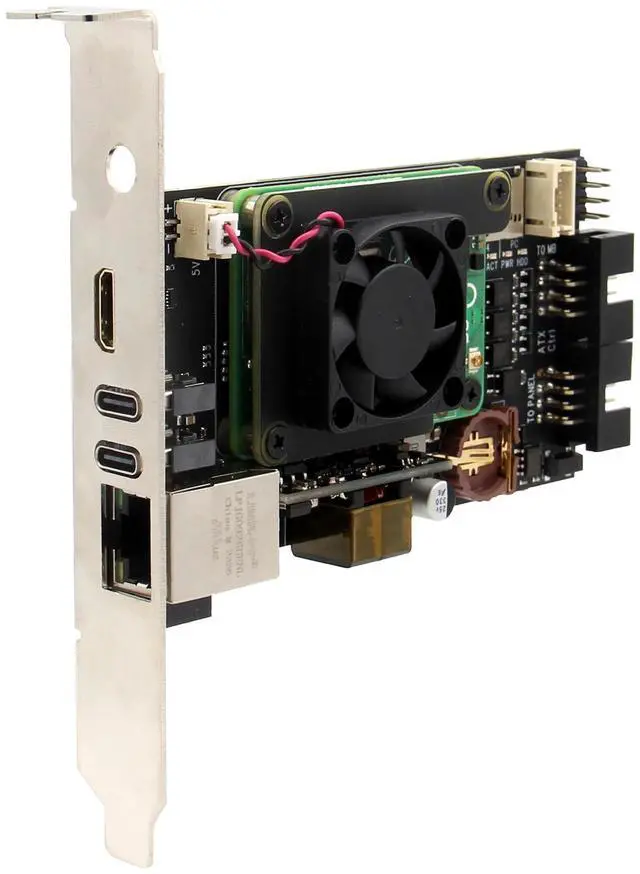
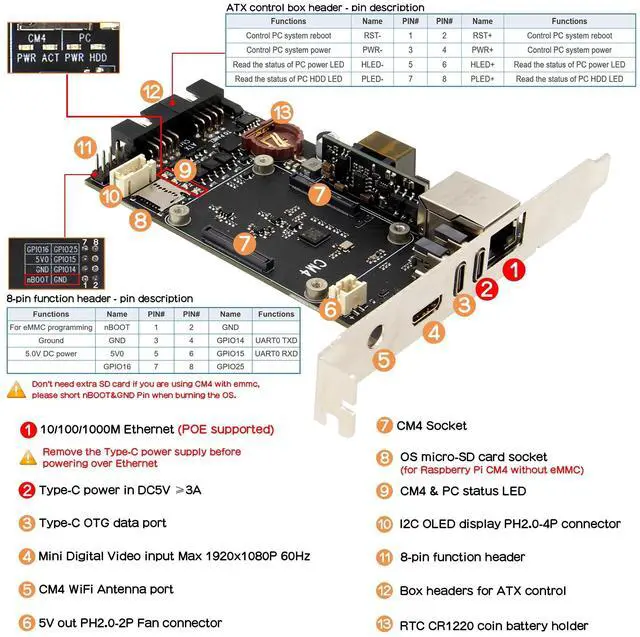
    Geekworm X651 Open Source KVM Over IP Kit PCIe Version Support KVM V3 PoE ATX Video CSI for Raspberry Pi Compute Module 4 (Not Include Raspberry Pi CM4)

    • What is it: This kit allows user to realize a KVM project with Raspberry Pi Compute Module 4 (CM4) which can control a computer using a web browser; Supports video and audio; Model: X651 V1.0
    • Compatiblity and User Manual: 1. for use with Raspberry Pi Compute Module 4 and compatible with all variants; 2. Google Geekworm Wiki and search X651 for user manual
    • Function: Remotely turn on/ turn off / restart your computer; configure configure the UEFI/BIOS; reinstall the OS using the Virtual CD-ROM or Flash Drive; remote use your keyboard and mouse; Simulate a keyboard, mouse, and a monitor and presented in a web browser, etc
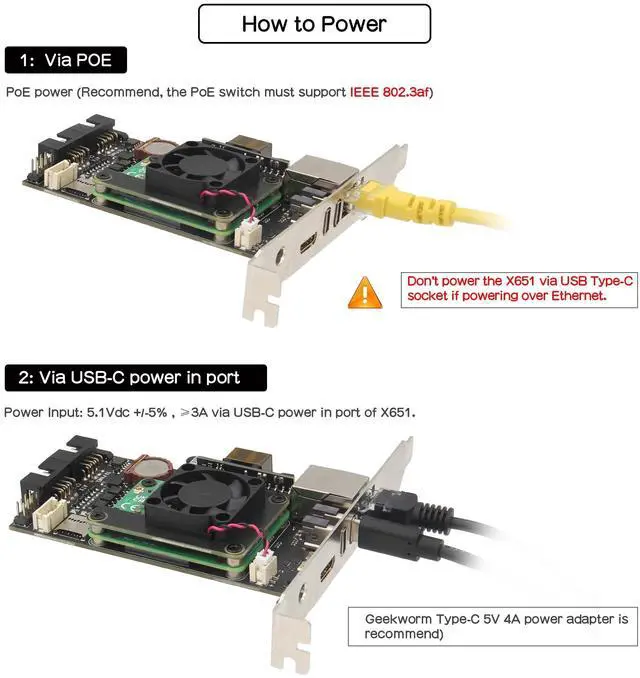
    • How to Power: 5Vdc +/-5% via POE (IEEE 802.3af, need a POE switch) or Power Input: 5.1Vdc +/-5% , 3A power via USB-C port of X651
    • How to Cool: X651 comes with an active cooling fan (X-FAN30 V1.0) to cool down the Raspberry Pi Compute Module 4, you can also replace it with C235 heatsink
    • Extra Need to be Prepared: Raspberry Pi CM4, TF Card(only need to CM4 w
    +
    +
    Overview
    Specs
    Reviews
    avatar

    Any questions? Our AI beta will help you find out quickly.

    What is it: This kit allows user to realize a KVM project with Raspberry Pi Compute Module 4 (CM4) which can control a computer using a web browser; Supports video and audio;
    Model: X651 V 1.0 ^^ Compatiblity and
    User Manual: 1. for use with Raspberry Pi Compute Module 4 and compatible with all variants;
    2. Google Geekworm Wiki and search X651 for user manual ^^
    Function: Remotely turn on/ turn off / restart your computer; configure configure the UEFI/BIOS; reinstall the OS using the Virtual CD-ROM or Flash Drive; remote use your keyboard and mouse; Simulate a keyboard, mouse, and a monitor and presented in a web browser, etc ^^ How to
    Power: 5Vdc +/-5% via POE (IEEE 802.3 af, need a POE switch) or
    Power Input: 5.1V dc +/-5%, 3A power via USB-C port of X651 ^^ How to
    Cool: X651 comes with an active cooling fan (X-FAN30 V 1.0 ) to cool down the Raspberry Pi Compute Module 4, you can also replace it with C235 heatsink ^^ Extra Need to be
    Prepared: Raspberry Pi CM4, TF Card (only need to CM4 without eMMC), Poe Switch or Power Adapter (Not included, need to prepare by yourself)


    Warranty & Returns

    Warranty, Returns, And Additional Information

    Warranty

    • Please contact the Seller directly for warranty information. Warranty information may also be found on the Manufacturer's website.
    • CONTACT

    Return Policies

    Manufacturer Contact Info

    LOADING...
    LOADING...