• $134.98
  • Free 30-day Returns
  • Ships from China.
    Price alert
    Shop it at NeweggBusiness.

    Meet Your Seller

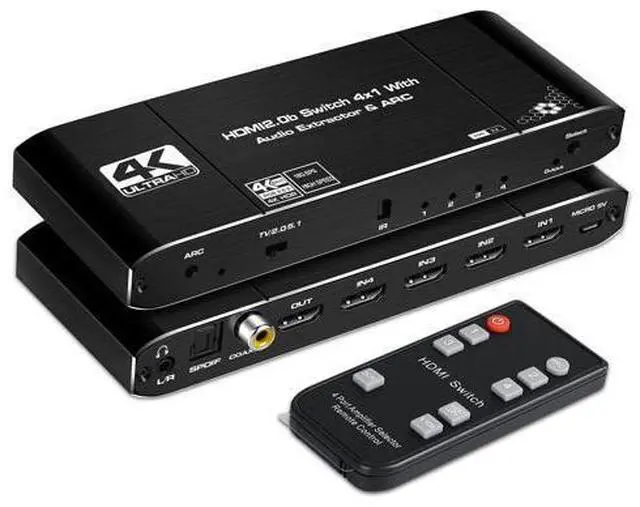
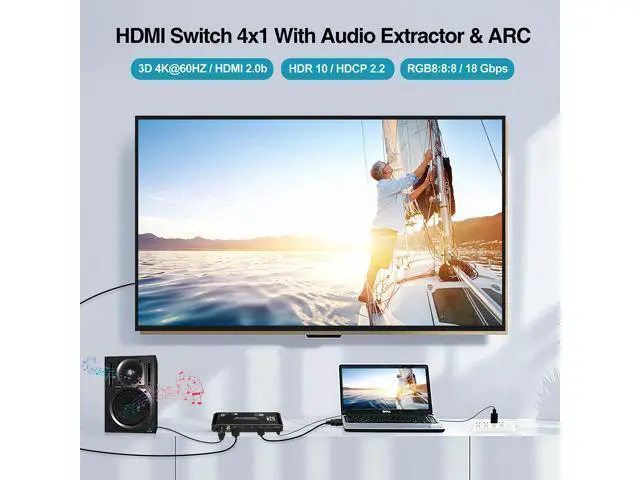
    4K@60Hz 4x1 HDMI Switch Audio Extractor with Optical Toslink SPDIF/Coaxial/3.5mm Audio Out, 4 Ports HDMI 2.0b Switcher with Remote Control Support ARC, HDCP 2.2, 3D

    Limited time offer, ends 06/28 By NexusPoint

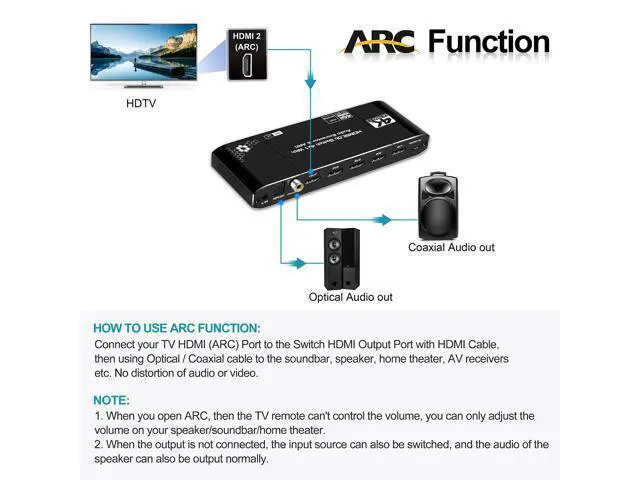
    • 4K60Hz HDMI Switch audio extractor splitter support 4 HDMI Inputs to 1 HDMI Output. --WARM TIPS-- ARC: First, please make sure your display support ARC function.
    • Second, using HDMI cable plug into HDMI ARC port on your display and the other side plug into the HDMI output on the switch.
    • Requirements of HDMI cable: 26AW (19+1PIN) HDMI 2.0 cable, input up to 5m (max),output up to 5m (max) ; 28AW (19+1PIN) HDMI 2.0 cable, input up to 3m (max),output up to 3m (max).
    • You should operate it properly when the switch is working, if you find the switch is not working, we suggest you unplug the power supply and plug it again.
    • When turn on the switch, by default, the input 1 led indicator will light on at the start when disconnect HDMI source.
    • It supports coaxial cable and Optical cable are up to 10 meters (max), if you choose optical audio out or coaxial audio out,you can enjoy 5.1CH or 2CH or audio copy.
    • If you choose 3.5mm audio out, you can enjoy 2CH or audio copy.
    • Maximum remote control distance is 8 meters, (Warm tip: To better control, we suggest you point at IR light of the switch, finger pulp to press it, wait 2 seconds each time before next press, please press it properly) you will be going to realize that the display will black screen about 5 seconds to change next source.
    • This is normal, please dont worry.
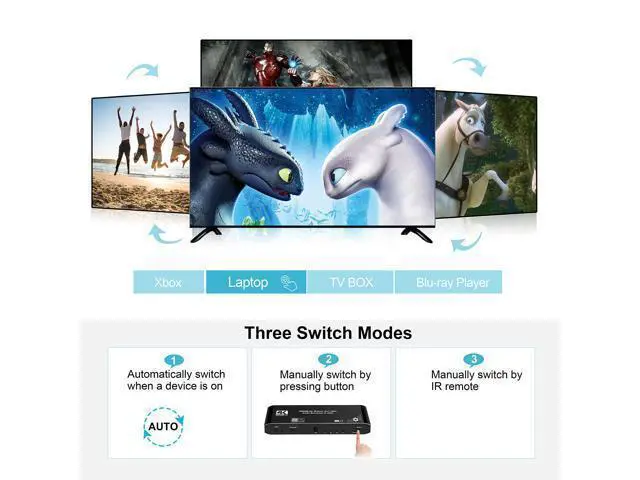
    • Automatic switch: It will automatic change from HDMI source A to HDMI source B when you turned on source B and back to source A when you turned source B off.

    +
    +
    Overview
    Specs
    Reviews
    avatar

    Any questions? Our AI beta will help you find out quickly.

    4K60Hz HDMI Switch audio extractor splitter support 4 HDMI Inputs to 1 HDMI Output.
    --WARM TIPS-- ARC: First, please make sure your display support ARC function. ^^Second, using HDMI cable plug into HDMI ARC port on your display and the other side plug into the HDMI output on the switch.
    ^^Requirements of HDMI cable: 26AW (19+1PIN) HDMI 2.0 cable, input up to 5m (max), output up to 5m (max); 28AW (19+1PIN) HDMI 2.0 cable, input up to 3m (max), output up to 3m (max). ^^You should operate it properly when the switch is working, if you find the switch is not working, we suggest you unplug the power supply and plug it again. ^^When turn on the switch, by default, the input 1 led indicator will light on at the start when disconnect HDMI source. ^^It supports coaxial cable and Optical cable are up to 10 meters (max), if you choose optical audio out or coaxial audio out, you can enjoy 5.1CH or 2CH or audio copy. ^^If you choose 3.5 mm audio out, you can enjoy 2CH or audio copy. ^^Maximum remote control distance is 8 meters, (Warm
    tip: To better control, we suggest you point at IR light of the switch, finger pulp to press it, wait 2 seconds each time before next press, please press it properly) you will be going to realize that the display will black screen about 5 seconds to change next source. ^^This is normal, please dont worry.
    ^^Automatic switch: It will automatic change from HDMI source A to HDMI source B when you turned on source B and back to source A when you turned source B off.


    Warranty & Returns

    Warranty, Returns, And Additional Information

    Warranty

    • Please contact the Seller directly for warranty information. Warranty information may also be found on the Manufacturer's website.
    • CONTACT

    Return Policies

    • Return for refund within: 30 days
    • Return for replacement within: non-replaceable
    • This item is covered by NexusPoint Return Policy

    Manufacturer Contact Info

    LOADING...