



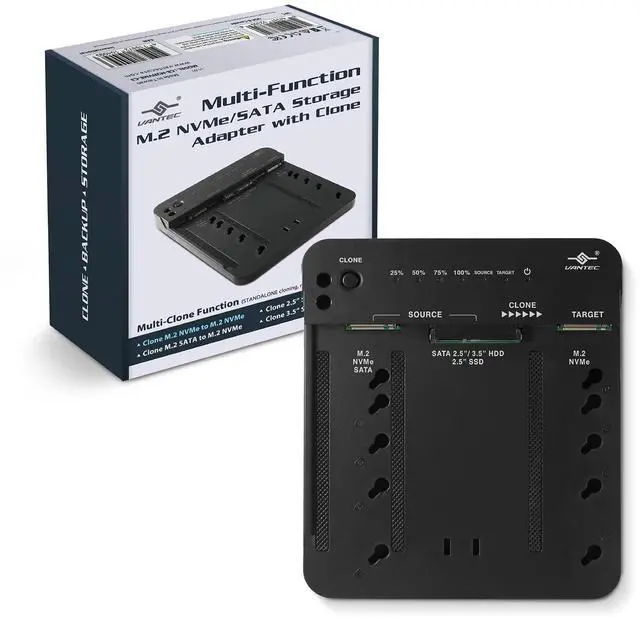

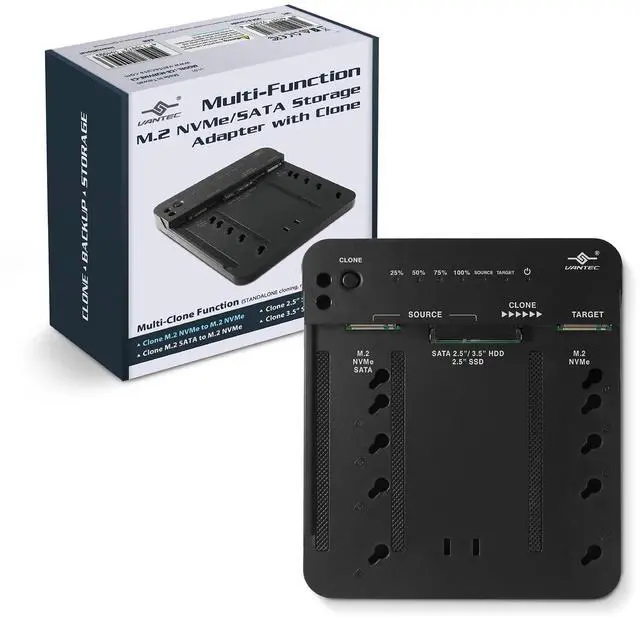


Multi-Function M.2 NVMe/SATA Storage Adapter with Clone (CB-M2NVME-C3)

Descriptions:
This product is a 2nd generation of the multi-function adapter that will allow you to connect different types of storage devices and allow you to clone (standalone), store, and manage your data when connected to your fast USB 3.2 Gen2x1 USB C interface on the computer system. Access your data on two storage devices each using their own drive letter, use as a Data recovery tool to access drives, transfer data between drives, access your storage like a dock or adapter, use as a USB backup device when connected to your system, and help you upgrade M.2 NVMe/M.2 SATA/SATA OS drive to M.2 NVMe OS drive. It is also backward compatible with all other slower USB ports.
Features:
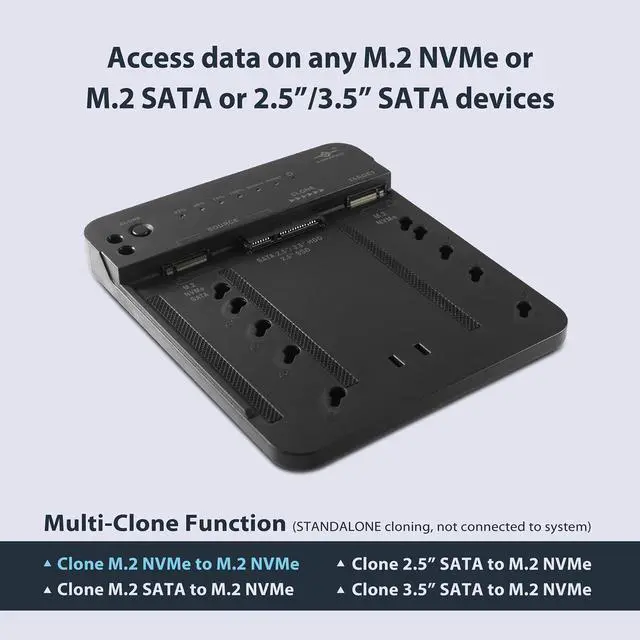
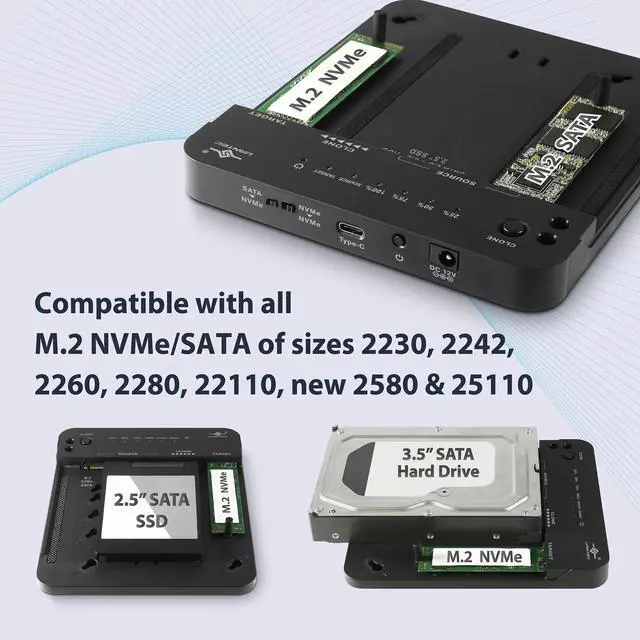
- Access data on any M.2 NVMe or M.2 SATA or 2.5”/3.5” SATA devices
- Compatible with all M.2 NVMe/SATA of size 2230, 2242, 2260, 2280, 22110, new 2580 & 25110
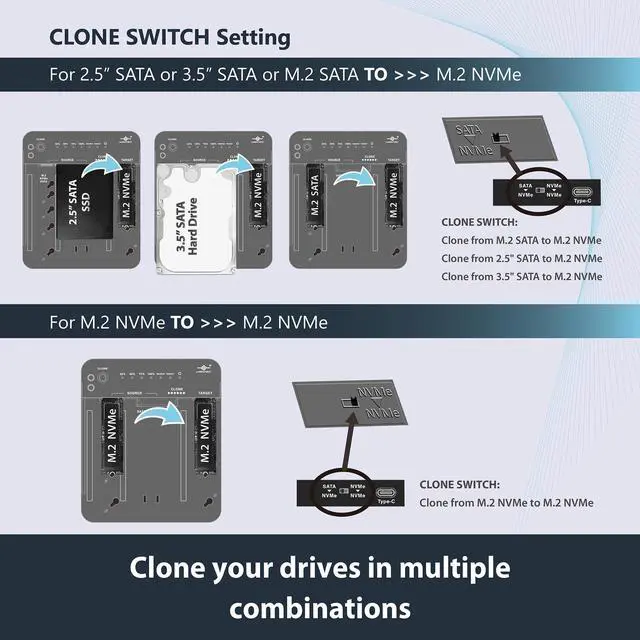
- Clone your drives in multiple combinations
- Use as a Data recovery tool to access drives
- Transfer data between drives
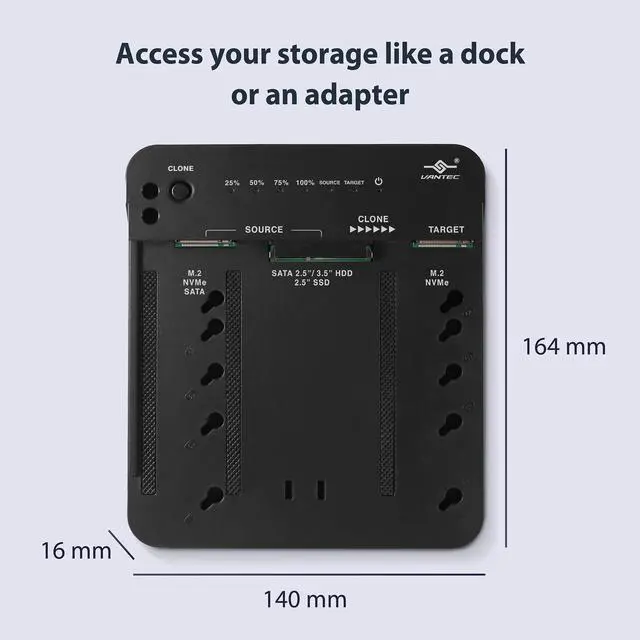
- Access your storage like a dock or an adapter
- Use as a USB backup device when connected to your storage
- Upgrade M.2 NVMe/M.2 SATA/SATA OS drive to M.2 NVMe OS drive
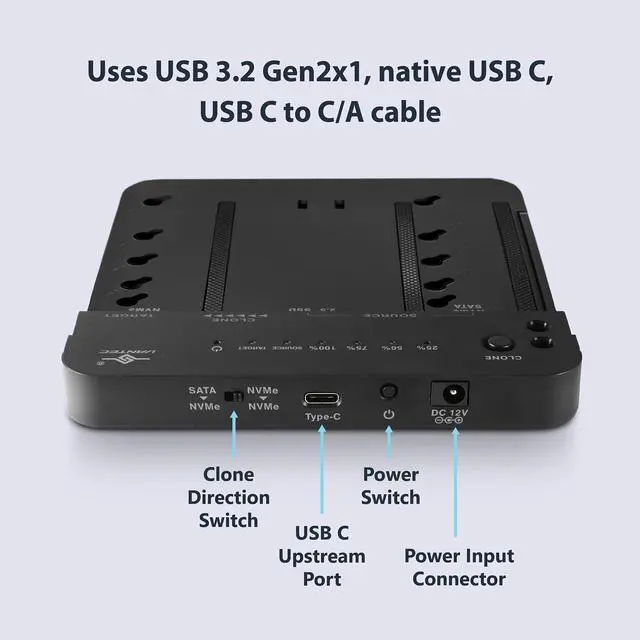
- Uses USB 3.2 Gen2x1 (10Gbps), native USB C, USB C to C/A cable
- Tool-free, no driver needed. Hot-swappable, plug & ready
- Compatible with All OS with USB support, UASP, BOT, TRIM
Access any M.2 or 2.5”/3.5” SATA devices; Clone drives; Data recovery; 10 Gbps; Tool-free; plug & ready

Upgrade M.2 NVMe/M.2 SATA/SATA OS drive to M.2 NVMe OS drive
Multi-Connection Function
>> Connect to different types of storage devices like M.2 NVMe, M.2 SATA, 2.5” SATA, 3.5” SATA
Multi-Clone Function (STANDALONE cloning, not connected to system)
>> Clone M.2 NVMe to M.2 NVMe; >> Clone M.2 SATA to M.2 NVMe; >> Clone 2.5” SATA to M.2 NVMe; >> Clone 3.5” SATA to M.2 NVMe
Software Clone Function (SOFTWARE Cloning, Connected to a system using software to clone)
>> Clone M.2 NVMe to M.2 NVMe; >> Clone M.2 NVMe to M.2 SATA; >> Clone M.2 NVMe to 2.5” SATA; >> Clone M.2 NVMe to 3.5” SATA
>> Clone M.2 SATA to M.2 NVMe; >> Clone 2.5” SATA to M.2 NVMe; >> Clone 3.5” SATA to M.2 NVMe
Multi-Storage Function to mount two drives at the same time
>> Mount M.2 NVMe and/or M.2 NVMe individually drive letter; >> Mount M.2 NVMe and/or M.2 SATA individually drive letter
>> Mount M.2 NVMe and/or 2.5” SATA individually drive letter; >> Mount M.2 NVMe and/or 3.5” SATA individually drive letter
Design for Windows 10/11, Mac OS X 10.10 or higher, and Newer Linux OS
Multi-Clone Function (STANDALONE cloning, not connected to system) ; Clone NVMe to NVMe; M.2 SATA to NVMe; 2.5” SATA to NVMe; 3.5” SATA to NVMe

Specifications:
Model: CB-M2NVME-C3
USB Connector: Native USB C, USB 3.2 Gen2x1 (USB reversible connector)
Device Connectors: M.2 NVMe, M.2 SATA, Standard SATA (for 2.5” /3.5”)
M.2 Size Support: 2230, 2242, 2260, 2280, 22110, new 2580 & 25110
SATA Drive Support: Standard 2.5” SSD/HDD, 3.5” SSD/HDD
Drive Capacity: M.2: 16TB, SATA: 24TB (Tested Capacity)
Power Supply: Ac Adapter, 12V/3A; Material: ABS Plastic
Item Dimensions (L x W x H): 6.5 x 5.5 x 0.6 inches / 164 x 140 x 16 mm; Item Weight: 10.0 oz. / 285 g
Cable Type and length: USB C to C/A, 15.7 inches / 400 mm
OS Support: Windows 10/11, Mac OS X 10.10 or higher, and Linux OS
Package Dimensions (L x W x H): 6.3 x 6.7 x 2.6 inches / 160 x 170 x 65 mm; Package Weight: (16.7 oz. / 476 g)
System Requirements: USB C or USB Type A port; Newer OS like Windows 10/11, OS X 10.10, latest Linux
Package Contents: Multi-Function M.2 NVMe/SATA Storage Adapter, M.2 Mount pole, AC adapter, USB C to C/A cable, Quick Install Guide
Country of Origin: Taiwan
Multi-Function M.2 NVMe/SATA Storage Adapter with Clone (CB-M2NVME-C3)
Descriptions:
This product is a 2nd generation of the multi-function adapter that will allow you to connect different types of storage devices and allow you to clone (standalone), store, and manage your data when connected to your fast USB 3.2 Gen2x1 USB C interface on the computer system. Access your data on two storage devices each using their own drive letter, use as a Data recovery tool to access drives, transfer data between drives, access your storage like a dock or adapter, use as a USB backup device when connected to your system, and help you upgrade M.2 NVMe/M.2 SATA/SATA OS drive to M.2 NVMe OS drive. It is also backward compatible with all other slower USB ports.
Features:
- Access data on any M.2 NVMe or M.2 SATA or 2.5”/3.5” SATA devices
- Compatible with all M.2 NVMe/SATA of size 2230, 2242, 2260, 2280, 22110, new 2580 & 25110
- Clone your drives in multiple combinations
- Use as a Data recovery tool to access drives
- Transfer data between drives
- Access your storage like a dock or an adapter
- Use as a USB backup device when connected to your storage
- Upgrade M.2 NVMe/M.2 SATA/SATA OS drive to M.2 NVMe OS drive
- Uses USB 3.2 Gen2x1 (10Gbps), native USB C, USB C to C/A cable
- Tool-free, no driver needed. Hot-swappable, plug & ready
- Compatible with All OS with USB support, UASP, BOT, TRIM
Access any M.2 or 2.5”/3.5” SATA devices; Clone drives; Data recovery; 10 Gbps; Tool-free; plug & ready
Upgrade M.2 NVMe/M.2 SATA/SATA OS drive to M.2 NVMe OS drive
Multi-Connection Function
>> Connect to different types of storage devices like M.2 NVMe, M.2 SATA, 2.5” SATA, 3.5” SATA
Multi-Clone Function (STANDALONE cloning, not connected to system)
>> Clone M.2 NVMe to M.2 NVMe; >> Clone M.2 SATA to M.2 NVMe; >> Clone 2.5” SATA to M.2 NVMe; >> Clone 3.5” SATA to M.2 NVMe
Software Clone Function (SOFTWARE Cloning, Connected to a system using software to clone)
>> Clone M.2 NVMe to M.2 NVMe; >> Clone M.2 NVMe to M.2 SATA; >> Clone M.2 NVMe to 2.5” SATA; >> Clone M.2 NVMe to 3.5” SATA
>> Clone M.2 SATA to M.2 NVMe; >> Clone 2.5” SATA to M.2 NVMe; >> Clone 3.5” SATA to M.2 NVMe
Multi-Storage Function to mount two drives at the same time
>> Mount M.2 NVMe and/or M.2 NVMe individually drive letter; >> Mount M.2 NVMe and/or M.2 SATA individually drive letter
>> Mount M.2 NVMe and/or 2.5” SATA individually drive letter; >> Mount M.2 NVMe and/or 3.5” SATA individually drive letter
Design for Windows 10/11, Mac OS X 10.10 or higher, and Newer Linux OS
Multi-Clone Function (STANDALONE cloning, not connected to system) ; Clone NVMe to NVMe; M.2 SATA to NVMe; 2.5” SATA to NVMe; 3.5” SATA to NVMe
Specifications:
Model: CB-M2NVME-C3
USB Connector: Native USB C, USB 3.2 Gen2x1 (USB reversible connector)
Device Connectors: M.2 NVMe, M.2 SATA, Standard SATA (for 2.5” /3.5”)
M.2 Size Support: 2230, 2242, 2260, 2280, 22110, new 2580 & 25110
SATA Drive Support: Standard 2.5” SSD/HDD, 3.5” SSD/HDD
Drive Capacity: M.2: 16TB, SATA: 24TB (Tested Capacity)
Power Supply: Ac Adapter, 12V/3A; Material: ABS Plastic
Item Dimensions (L x W x H): 6.5 x 5.5 x 0.6 inches / 164 x 140 x 16 mm; Item Weight: 10.0 oz. / 285 g
Cable Type and length: USB C to C/A, 15.7 inches / 400 mm
OS Support: Windows 10/11, Mac OS X 10.10 or higher, and Linux OS
Package Dimensions (L x W x H): 6.3 x 6.7 x 2.6 inches / 160 x 170 x 65 mm; Package Weight: (16.7 oz. / 476 g)
System Requirements: USB C or USB Type A port; Newer OS like Windows 10/11, OS X 10.10, latest Linux
Package Contents: Multi-Function M.2 NVMe/SATA Storage Adapter, M.2 Mount pole, AC adapter, USB C to C/A cable, Quick Install Guide
Country of Origin: Taiwan